

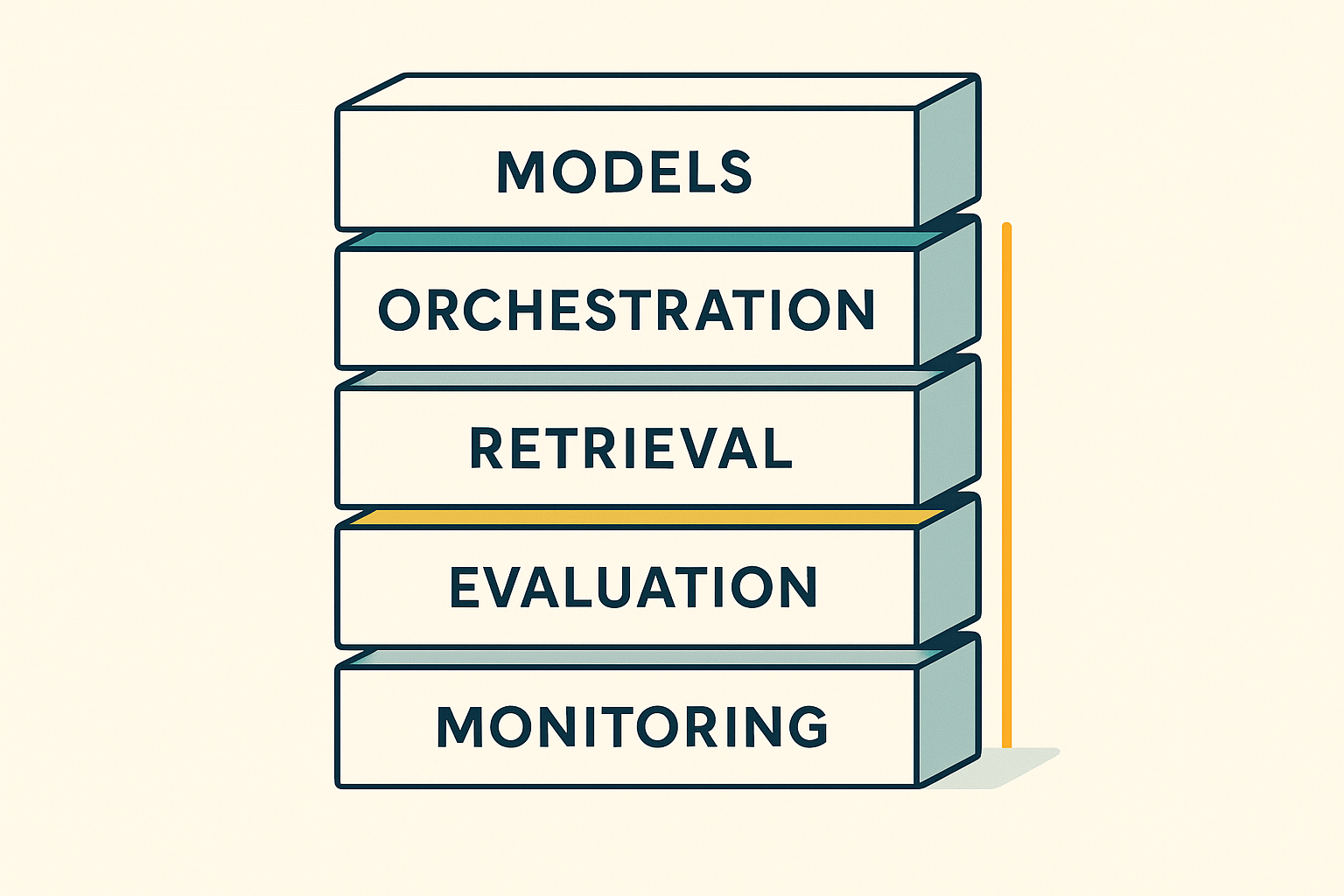
Building AI-powered applications in 2026 demands an intentional, lean stack that carries you from ideation to production without breaking the bank or burying you in complexity. For solo developers and small teams, the right choices early on are the difference between shipping weekly versus perpetually refactoring.
This guide walks through the entire lifecycle—ideation, prototyping, evaluation, shipping, and monitoring—curating a future-proof stack optimised for agility, cost, governance, and the realities of emerging markets (including bandwidth and device constraints across developing countries).
Think of this as a field manual, not a vendor brochure. You’ll find decision frameworks, patterns you can copy, and “red-flag” checklists to keep you out of trouble.
The Lifecycle Map
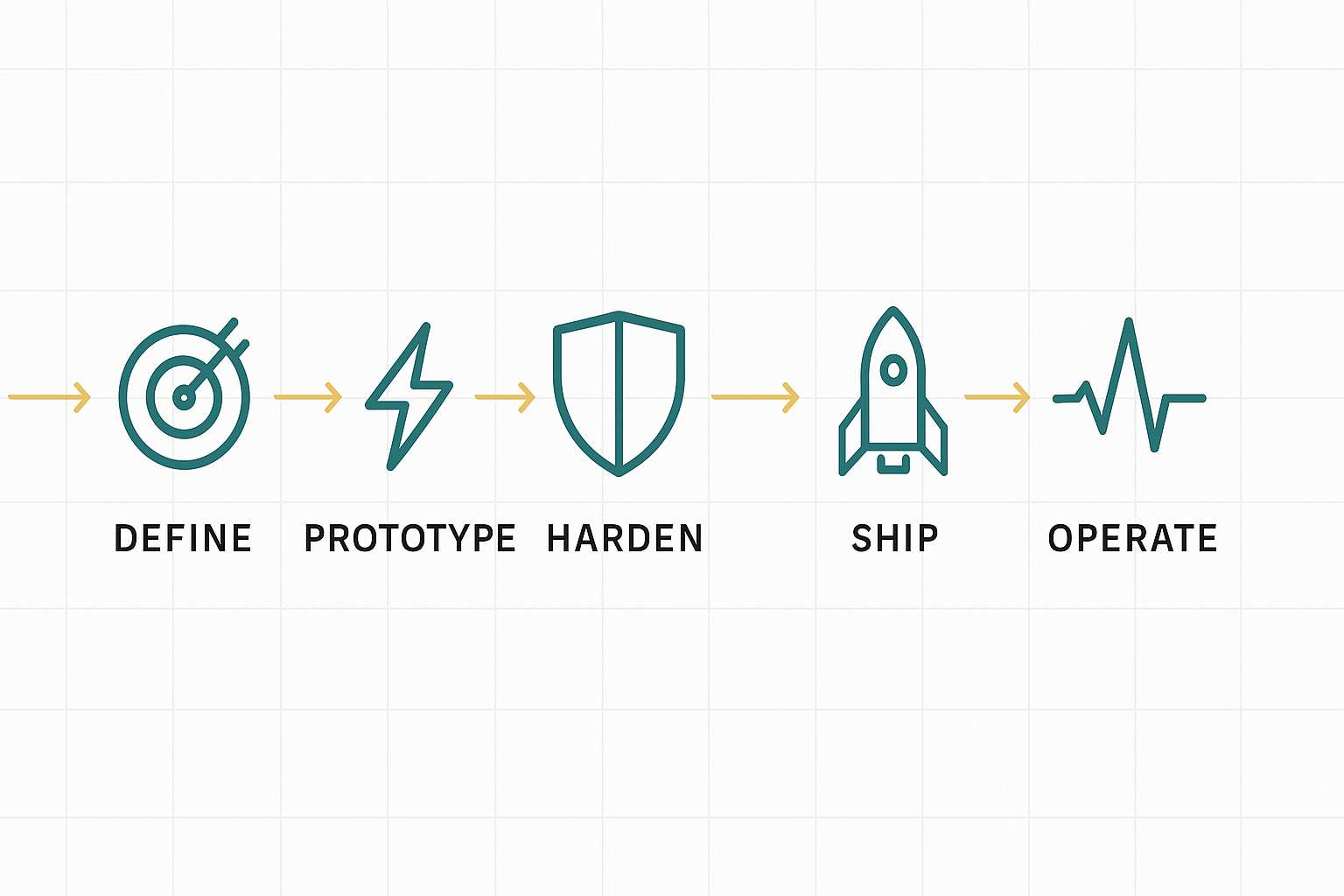
AI products rarely fail because a model can’t answer a question. They fail because teams didn’t define a lifecycle and hold the line. Use this map to anchor decisions:
- Define
- Problem, success metric, cost ceiling, privacy classification.
- “Gold set” of 50–200 representative examples you’ll use for evaluation later.
- Prototype
- Hosted models first; minimal orchestration; tiny vector store; throwaway UI.
- Move only what proves itself into the keepers’ pile.
- Harden
- Add retrieval, schema-validated function calls, persistent logs, and basic tests.
- Evaluate cost/unit, add rate limits and degrade modes.
- Ship
- Containerise; add load shedding; set SLOs; wire alerts; implement redaction.
- Shadow traffic + canary rollout; rollback plans ready.
- Operate
- Monitor drift; run weekly evals; budget caps; prompt/model versioning.
- Quarterly refits: consolidate tools and ruthlessly pay off tech debt.
Tape this lifecycle above your desk. Every choice should map to a stage.
The Anti-Sprawl Principle (and how to enforce it)
The allure of “one more tool” is real. Tool sprawl inflates cognitive load, increases integration costs, and multiplies failure modes. The cure is an explicit stack budget:
- Set a cap: 3 core platforms for v1 (model/runtime, orchestration, retrieval).
- Prefer open interfaces: REST/JSON or gRPC; ONNX for portability; standard auth (OAuth/JWT).
- Kill switches: Pre-decide what you’ll retire when the fourth platform arrives.
- Quarterly consolidation: Remove or merge at least one tool every three months.
Working rule: If a new tool doesn’t 2× a critical metric (time-to-ship, latency, cost, accuracy), it doesn’t join the party.
Example stack budget
- Model/runtime: hosted API (fastest prototyping) → swap to local inference only if needed.
- Orchestration: light function calling + a small utility layer (not three agent frameworks).
- Retrieval: one vector store + one blob store; hybrid search if/when needed.
The Model Layer: Hosted APIs vs Local Inference

Your model strategy drives latency, cost, privacy, and ops. Choose with a simple two-axis scorecard: (Volume × confidentiality).
Hosted APIs (cloud LLMs and specialised endpoints)
Why they win: zero set-up, constant improvements, strong uptime; excellent for prototypes and moderate-volume apps.
Why they hurt: cost is usage-linked; latency is at the mercy of the network; a vendor policy controls data control.
Use when:
- You’re validating a product, not optimising pennies.
- Traffic is spiky and mostly low-volume.
- Data isn’t highly regulated, or you have strong DPAs.
Keep yourself safe:
- Set a complex monthly budget and per-feature caps.
- Log prompts/responses post-redaction only.
- Pin model versions where possible; test before version bumps.
Local/Edge Inference (self-hosted or device-hosted)
Why it wins: predictable costs; lower tail latency; complete data control; works offline.
Why it hurts: DevOps and MLOps burden; hardware costs; you own scaling and failover.
Use when:
- High volume and predictable workloads.
- Privacy/regulatory constraints require data to stay on-prem.
- Offline/edge experiences are a feature, not a fallback.
Keep yourself sane:
- Use modern runtimes (vLLM, TGI) and quantised models where accuracy allows.
- Treat models as dependencies: version, checksum, and rollback like any other artefact.
- Start with a single GPU target and scale horizontally only after saturating it.
Decision snapshot
- Prototype: hosted API.
- Prod v1: hosted + caching + response truncation/summary.
- Scale: hybrid—local for the hot path; hosted for long-tail/cold path.
Data Layer: Retrieval That Actually Works

RAG (retrieval-augmented generation) upgrades your product from “parrot” to “context-aware assistant.” Most RAG disappointments come from three mistakes: bad chunking, weak reranking, and no grounding signals.
Minimal viable RAG (MVR) pattern
- Blob store for raw docs (S3/GCS/minio).
- Text extraction that preserves structure (headings, tables).
- Semantic chunking (recursive split by headings/sections), typical 300–800 tokens with 10–20% overlap.
- Vector store (Weaviate, Chroma, Pinecone) with metadata (source, timestamp, access controls).
- Hybrid search (BM25 + vector) to beat synonyms and rare terms.
- Reranker for the top 10–20 candidates (cross-encoder or vendor rerank endpoint).
- Grounding in the response: inline citations or footnotes with source IDs.
Accuracy boosters
- Domain embeddings: start with general models; switch to domain-tuned only if you see systematic misses.
- Deduping: removing near-duplicates improves precision and cuts embedding costs.
- Freshness: rank by recency for fast-changing domains; pre-warm indices on ingest.
Security note: enforce row-level permissions at retrieval time—don’t fetch docs a user isn’t allowed to see and “hope” the model won’t mention them.
Orchestration Patterns: From Utilities to Agentic Systems
Don’t start with a super-agent. Start with a deterministic utility layer and only add autonomy where it clearly helps.
Level 1 — Utility layer (recommended default)
- A thin wrapper for model calls (timeouts, retries, truncation).
- JSON-schema function calling with strict validation.
- Small library of tools (search, DB read/write, calculator, webhooks).
Why: predictable, testable, debuggable.
Level 2 — Chaining & memory (when flows grow)
- Use a lightweight framework or write a 100-line coordinator.
- Keep state explicit; snapshot memory to a store; bound its size.
- Add guardrails (regex/JSON validators, content filters).
Level 3 — Agentic orchestration (rarely your day-one need)
- Multi-agent systems (AutoGen/Crew-style) for decomposable workflows: research → draft → critique.
- Hard limits on steps, tokens, and tool calls.
- Always wrap with a supervisor who enforces budgets and halts on non-convergence.
Production rule of thumb: The more “autonomous” the system, the more you must invest in evaluation and constraints. Most teams never need beyond Level 2.
Evaluation & CI: Make Breakage Boring

Small prompt changes, model version bumps, or new document ingests will shift behaviour. Treat evaluation like tests in classical software.
The gold set
- 50–200 representative input→expected-behavior pairs.
- Cover happy path, edge cases, adversarial inputs, and “it must not say X” negatives.
- Store alongside code; version them; tag by feature.
Metrics that matter
- Task accuracy (exact match/rubric score / judge-LLM with rubric).
- Grounding (percentage of claims with citations from retrieved docs).
- Toxicity/safety (rule-based flags + model-based classifiers).
- Latency & cost (p50, p95; $/1000 requests).
- Stability (variance across runs; flakiness threshold).
CI/CD wiring
- Run evals on every PR that touches prompts, retrieval, or tool logic.
- Block deploys if metrics drop beyond tolerance (e.g., −2% accuracy, +20% cost).
- Weekly scheduled evals to catch model drift and data skew.
Tip: Use a smaller, consistent judge model for scoring; the point is relative change, not philosophical truth.
Shipping: Serverless vs Containers (and when to switch)

Pick your runtime with two questions: Do you need GPUs or long-running compute? And does your traffic stay hot (steady) or arrive in bursts (spiky)? If you need GPUs or jobs that routinely run beyond typical function limits, or if you have constant, high throughput, containers win. If your workload is bursty, short, and mostly I/O-bound, serverless is the fast lane.
Serverless (Lambda/Cloud Functions/Vercel) shines for thin, stateless workloads at unpredictable volumes. You get elastic scaling and near-zero ops, but pay the price with cold starts, short timeouts, and limited GPU options. Use it for ingress (auth, request shaping), webhooks, pre/post-processing, lightweight eval runners, and scheduled tasks.
Don’t push it into GPU inference or multi-minute pipelines unless your provider gives you explicit knobs (provisioned concurrency, min-instances) and you’re okay paying to keep it warm.
Containers (ECS / Cloud Run / Kubernetes) serve as the durable layer for inference services (LLMs, rerankers), vector databases, and feature stores.
You get explicit control, GPU access, stable tail latency, sidecars for caching/metrics, and predictable performance. You also inherit responsibility for health checks, autoscaling policies, and cost. Containers are overkill for tiny, sporadic jobs—but perfect for hot paths that need tight SLOs.
A hybrid pattern that works
- Edge/serverless front door: terminate TLS, verify auth, trim/validate payloads, enforce request budgets.
- Queue: hand off anything that could exceed p95 limits.
- Container workers: do the heavy lifting (RAG, rerank, LLM calls, batching).
- Callback or poll: return
202 Accepted+ a status URL; complete via webhook or client polling. - Sidecars: Redis/ristretto for response and retrieval caches, OpenTelemetry collector for traces, and a tiny policy gate that can flip to degrade modes without redeploying.
This split keeps your API responsive under burst, while the workers scale horizontally with honest backpressure.
When to switch (quantified)
Migrate a route from serverless to containers when one or more of these hold for a week:
- Tail latency pain: p95 regularly breaches your SLO (e.g., 500–800 ms) due to cold starts or timeouts.
- Duration profile: ≥30% of invocations exceed your function’s comfortable runtime window.
- Throughput shape: sustained concurrency (e.g., >100 rps for hours) makes provisioned-concurrency costs rival a small container fleet.
- Vendor fit: you need GPUs, custom networking, big local caches, or gRPC streaming.
- Economics: cost/request in serverless exceeds a steady container service at the same SLO.
Keep serverless for the glue (ingress, webhooks, scheduled jobs) even after you move the hot path.
Observability: See, Don’t Guess
If you can’t trace it, you can’t fix it. Observability in AI apps includes traces, prompt/version lineage, redaction, and user feedback.
What to log (after redaction):
- Input hash + metadata (tenant, feature flag, model version).
- Retrieved contexts (doc IDs, scores).
- Tool calls (name, arguments, result summary).
- Output text + token counts + latency.
- User feedback (thumbs, reasons, corrections).
Prompt/version lineage
- Treat prompts as code: store in Git (or a prompt registry) with semantic versioning.
- Tag deploys with prompt+model versions; keep rollback buttons one click away.
Redaction
- PII scrubbing before logs and traces; allow necessary fields only.
- Separate “secure store” for unredacted records if legally required, with tight access controls.
Feedback loop
- Simple UI controls: helpful/unhelpful, “why,” and a “see sources” toggle.
- Weekly triage: mine the top 20 worst items and turn them into gold-standard cases.
Cost Control: Unit Economics, Budgets, and Degrade Modes
Cost control starts with a simple, living worksheet: define your assumptions (average input/output tokens per request, typical RAG lookups and reranker passes, and your p50/p95 latency targets), price each moving part (model cost per 1K tokens or per-second inference, vector store storage and queries, reranker fees, and any GPU/egress), then compute the only numbers that matter—cost per request at p50 and p95, cost per active user per day, and total monthly burn at your forecasted request volume.
A quick mental model helps: cost/request ≈ model(tokens_in + tokens_out) + retrieval(embeds + queries) + rerank(top-k) + infra(GPU time + egress); scale it by daily requests to sanity-check your runway.
Keep the system on budget by wiring controls directly into the runtime rather than a spreadsheet. Set hard-per-feature caps with alarms at 60/80/100 per cent, and let the app enforce them.
Cache aggressively where licenses allow so common embeddings and completions don’t keep hitting the meter; summarise and truncate conversation state so context doesn’t bloat; and when load or spend spikes, automatically degrade to a smaller model, fewer retrieved documents, or retrieval-only answers.
If something goes sideways, fail shut with a clear message instead of churning tokens in a death spiral. The goal isn’t austerity—it’s predictable unit economics that let you grow without surprises.
Security & Governance: Boring, Necessary, Non-Negotiable
Security failures cost more than latency failures. Treat governance as a paved road, not a speed bump.
Secrets & keys
- Vault your credentials; never store them in code or build logs.
- Rotate keys quarterly or on personnel change.
- Per-feature API keys: breach one, don’t breach all.
Dependency hygiene
- Automated scans (Dependabot/Snyk) + monthly patch windows.
- Pin versions for critical components (runtimes, vector DBs, splitters).
Policy gates
- Pre-deploy checks: PII redaction enabled? Logging levels correct? Budgets configured?
- Data-in/data-out rules: what can be sent to vendors; anonymise when plausible.
- Audit trail: who changed prompts/models, when, why, and how it performed.
Access control
- Least privilege IAM; separate prod vs. staging projects; break-glass account held by ops.
- Per-tenant isolation for multi-tenant apps; row-level security in retrieval.
Africa Ops Lens: Bandwidth, Power, Devices
Designing for African contexts raises the bar for resilience and efficiency—and makes your product better everywhere.
Bandwidth-aware design
- Assume 3G speeds (200–500 kbps) and intermittent connectivity.
- Compress responses (gzip/br), paginate aggressively, lazy-load.
- Cache on the client; design for idempotent retries.
Edge/offline
- On-device/near-edge inference for critical paths (Jetson Nano class or mobile CPU with quantised SLMs).
- Queue writes when offline; sync later with conflict resolution.
- SMS/USSD fallbacks for essential workflows.
Mobile-first constraints
- 2–4 GB RAM devices; avoid heavy SDKs; stream results progressively.
- Keep prompts short and use smaller local models for on-device transforms (e.g., transliteration, NER).
Power reliability
- Graceful shutdown/restart, store minimal state regularly, and support resumable jobs.
- Prefer stateless services; tolerate clock skew and missed cron windows.
Architecture Patterns You Can Copy
A) Conversational Support Bot (low-to-mid traffic)
- Model: hosted mid-tier; guardrail classifier in front.
- Retrieval: hybrid (BM25 + vectors), cross-encoder rerank.
- Orchestration: JSON function calling for ticket lookup and order status.
- Ops: serverless API + containerised retrieval service; Redis cache.
- Controls: per-tenant budgets; summary after N turns; cost dashboard.
B) Field-Ops Assistant (low bandwidth, offline friendly)
- Model: quantised SLM on device for NER/form filling; cloud LLM for summaries when online.
- Retrieval: local mini-index (critical manuals) + cloud sync.
- Orchestration: small state machine; retries with exponential backoff.
- Ops: job queue; conflict resolution on sync; SMS fallback.
C) Document QA for Compliance (privacy-heavy)
- Model: local/virtual-private inference; no raw PII leaves the boundary.
- Retrieval: strict ACLs; audit logging for every doc touch.
- Orchestration: deterministic chain; enforce citation presence.
- Ops: canary deploys; weekly evals including “hallucination zero-tolerance” tests.
Prompts, Tools, and Outputs: Make the Contract Explicit
Schema-first thinking
- Define function schemas with types and constraints; validate before execution.
- If the model must return JSON, enforce a parser with retries and a short “fix-it” prompt on failure.
Deterministic tools
- Keep tools idempotent (safe to retry).
- Add cost annotations: know which tools are “expensive” (search, DB joins) and budget them.
Output contracts
- If the user expects citations, fail without them rather than guessing.
- For UI surfaces, keep design tokens fixed; models fill content, not structure.
Testing Playbook (copy/paste)
Unit tests
- Prompt returns valid JSON under 1,000 randomised inputs.
- Tool call args meet schema; invalids are rejected with a helpful message.
- Retrieval returns K documents with the correct ACLs.
Integration tests
- Full flow with synthetic docs; check latency, citations present, cost bound.
- Degrade mode triggers when you simulate rate-limit or GPU exhaustion.
Adversarial tests
- Profanity, prompt-injection attempts, and PII leakage challenges.
- Timeouts and retries: force tool failures and confirm graceful recovery.
Regression
- Run the complete gold set on every PR touching prompts/rag/tools.
- Track deltas; block deploy on defined thresholds.
Incident Response: When Things Go Sideways
Incidents happen: vendor outage, cost explosion, bad deploy, poisoned ingest. Have a runbook.
Red button
- One flag turns off non-essential features and switches to safe models.
- Hard kill for expensive endpoints if the spend exceeds the runway targets.
Triage flow
- Stabilise: rate limit → degrade → pause certain features.
- Identify: trace IDs, model/prompt version, last successful state.
- Roll back: prompts/models/configs via version tags.
- Postmortem: human-readable; action items with owners and dates.
Communication
- Status page (even a Notion doc) with a timestamped log.
- Transparent notes: what’s affected, workaround, next update time.
Team Hygiene for Solo Devs and Tiny Crews
You don’t need five roles; you need five habits.
- PR discipline: Even if you’re solo, open PRs; write what/why in human language.
- Weekly eval hour: Non-negotiable; review worst cases and fix two.
- Budget check: 10-minute daily glance at spend and p95 latency.
- Tech debt jar: Write a 1-line issue whenever you “cut a corner.” Triage weekly.
- Quarterly refit: Reduce stack size; remove or merge at least one tool or service.
Case Vignettes (compressed, real-world flavoured)
Vendor-lock whiplash
A team launched on a premium, hosted model—delightful until costs scaled faster than revenue. They moved hot paths to a quantised local model for classification/ranking and reserved the premium model for complex queries. Net effect: 70% cost drop with negligible UX change. The lesson: hybridise thoughtfully.
RAG that actually cited sources
Switching from naive fixed-size chunks to semantic chunking + cross-encoder rerank improved answer faithfulness and reduced “source mismatch” tickets by ~20%. The lesson: retrieval quality beats “bigger context window.”
Incident avoided by a $0 script.
A simple daily script compared yesterday’s cost/request to last week’s median. When it spiked, the system auto-switched to a smaller model and paged the owner—saved a long weekend. The lesson: alarms and degrade modes are cheap insurance.
Checklists (print these)
Readiness to Prototype
Ready to Ship v1
Operate Weekly
18) Frequently Avoided Traps (and antidotes)
Trap 1 — “We’ll add tests later.”
Better default: Start with a 50-item gold set on day two.
Quick fix: Wire the gold set into CI now; block deploys on >2% accuracy drop or >20% cost rise.
Trap 2 — “A bigger context window will fix hallucinations.”
Better default: Better retrieval, reranking, and mandatory citations.
Quick fix: Add hybrid search + cross-encoder rerank; fail closed when sources are missing.
Trap 3 — “Let’s try this agent framework; it looks powerful.”
Better default: Level-1 utility layer (schema-validated function calls) until proven insufficient.
Quick fix: Cap steps/tokens; add a supervisor that halts on non-convergence.
Trap 4 — “Optimise costs after launch.”
Better default: Budget caps and degrade modes on day one.
Quick fix: Per-feature daily spend limits, alarms at 60/80/100%, auto-switch to a smaller model on breach.
Trap 5 — “Everyone gets admin; we’re small.”
Better default: Least-privilege IAM from the start.
Quick fix: Separate staging/prod projects, rotate keys, and create a break-glass account with logging.
Trap 6 — “Just log everything; we’ll sort PII later.”
Better default: Redact at ingestion; store unredacted only where legally required.
Quick fix: Drop-in PII scrubbing (names/IDs/emails) before traces; add allow-lists for sensitive fields.
Trap 7 — “More tools = more velocity.”
Better default: A stack budget: 3 core platforms for v1.
Quick fix: Quarterly consolidation: remove one tool or merge responsibilities every three months.
Trap 8 — “RAG is just chunk and pray.”
Better default: Semantic chunking + hybrid search + rerank, with metadata and ACLs enforced at fetch.
Quick fix: Move to 300–800-token semantic chunks (10–20% overlap), add BM25+vector retrieval, and rerank the top 20.
Trap 9 — “We’ll remember which prompt worked.”
Better default: Prompt/model versioning with changelogs and rollbacks.
Quick fix: Tag prompts (e.g., answer-v1.3-safety) and pin model versions; one-click rollback in deploys.
Trap 10 — “Incidents? We’ll improvise.”
Better default: A written runbook and a red button.
Quick fix: Define stabilize→identify→rollback steps; add a kill-switch that disables expensive features and flips to safe models.
Trap 11 — “Latency is fine; users will wait.”
Better default: Design for p95, not p50.
Quick fix: Add caching, rate limits, and queues; set SLOs (e.g., p95 ≤ 700 ms) and alert on breach.
Trap 12 — “Africa is an edge case; optimise later“
Better default: Bandwidth-aware by design: compress, paginate, offline queues, and quantised on-device models where possible.
Quick fix: Test on 3G profiles; add offline job queues with resumable sync and an SMS/USSD fallback for critical acti
Putting It All Together (a 30-day plan)
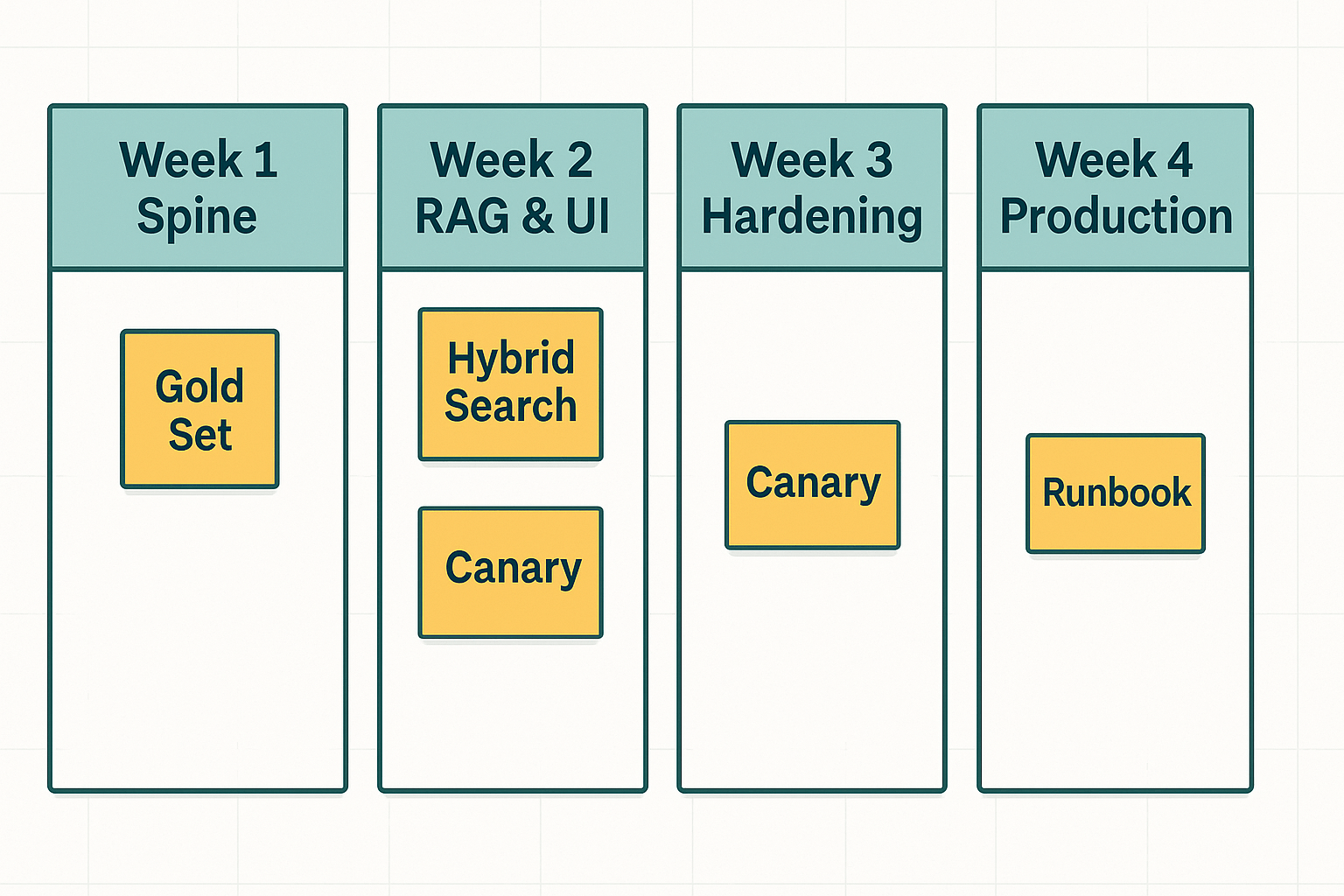
Week 1: Spine
- Pick a hosted model; build a tiny API; start a gold set; use one vector DB; use a chunker.
- Implement function calling with JSON schema; log everything (redacted).
Week 2: RAG & UI
- Hybrid search + rerank; show citations in UI.
- Basic eval harness; 50 gold-set items; nightly run.
- Cost dashboard with model, vector, and rerank line items.
Week 3: Hardening
- Canary deploy; rate limit per tenant; degrade mode to smaller model.
- Alerts for budget and latency; retry/backoff patterns; resumable jobs.
Week 4: Production posture
- Weekly eval ritual; doc an incident runbook; rotate one set of keys.
- Trim stack: remove any tool you barely used; write the “why.”
By day 30, you’ll have a lean, testable, monitored system you can iterate weekly—without a CFO breathing down your neck.
Conclusion
The 2026 AI developer stack isn’t about collecting tools; it’s about disciplined flow. Pick interoperable components. Start hosted; move hot paths local if economics demand it. Treat retrieval as a first-class system, not a plugin.
Evaluate like a scientist, ship like a pragmatist, and operate like a minimalist. If you’re building for bandwidth-constrained or power-intermittent environments, your resilience work will make the product better everywhere else.
The teams that win don’t chase the biggest model. They build the most observable, evaluable, and cost-aware system that reliably solves a user’s problem—then they refine it every week.